
Asset Animations
Some 3D models carry their own animations, for example a drill rig with a turning head or a conveyor that moves. When you load such a model as an asset, Spatial Integration lists its animations in the Asset Animations flyout on the right edge of the window.
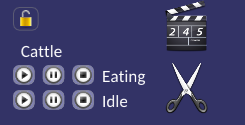
The flyout groups the animations under the name of the layer they belong to. If no loaded model contains an animation, the flyout says so.
Playing an Animation
Each animation has three buttons:
| Button | Action |
|---|---|
| Play | Start the animation from the beginning |
| Pause | Pause the animation where it is. Press it again to carry on from the same point |
| Stop | Stop the animation. Play then starts it again from the beginning |
An animation plays in step on every copy of a model. To play different or unsynchronised animations, load the model again as another layer.
Tip
Asset animations are separate from flythroughs. To move the camera through the scene, see Flythrough.