
Drillhole Display
When a drill layer is added to the scene (see the Drill Manager), Spatial Integration gives it a set of visualisations. Each visualisation draws a different aspect of the holes and is configured independently.
The Collar and Trace visualisations described on this page are ready to use as soon as the layer is added. The visualisations that draw your logged data are listed in the Downhole Display section at the bottom of this page.
To open a visualisation's editor, hover over the drill layer to bring up its flyout, then click the visualisation's symbology button.
Collars
The Collar visualisation draws a marker at the top of each hole. Collars are the quickest way to see where your holes are and to pick out a hole in a crowded scene.
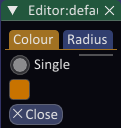
The collar editor sets the colour and size of the collar markers. All collars in a layer are drawn with the same colour and radius.
Traces
The Trace visualisation draws the desurveyed path of each hole from the collar to the end of hole, showing the true three-dimensional shape of the hole, including any deviation recorded by the downhole surveys.
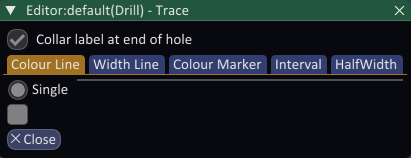
The trace is drawn as a ribbon by default. To draw traces as simple lines instead, tick Display drill trace as line in Configure. The trace colour and width are set as single values. Depth markers are drawn down the hole, and you can set their spacing and colour.
Turning labels on shows the depth beside each depth marker and the hole depth at the bottom of the hole. Tick Collar label at end of hole to show the hole name at the bottom of the hole as well.
Downhole Display
The remaining visualisations draw the interval and point data you imported through the Drill Manager. Add as many of each as you need by right-clicking the drill layer and choosing Add Visualisation, then configure each one to show the field you are interested in.
- Discs colour and size discs along the hole from interval or point data.
- Graph draws a downhole graph of a numeric field alongside the hole (adding or editing one requires the Professional edition).
- Structure draws oriented discs for structural measurements, using their dip and dip direction (adding or editing one requires the Professional edition).