
Anisotropy
Note
Coming in Spatial Integration version 3.
Continuity in geology is almost never the same in every direction. A sedimentary horizon persists for hundreds of metres along bedding and a few metres across it. A vein set is continuous along strike and down dip and nothing in between. A plunging shoot is continuous down plunge only. Describing that direction dependence - anisotropy - usually improves an interpolation more than any other single change you can make.
The Ellipsoid
Anisotropy is described as an ellipsoid centred on each estimated point. Its long axis points along the direction of best continuity, and its shape says how much sooner samples lose their influence in the other two directions.
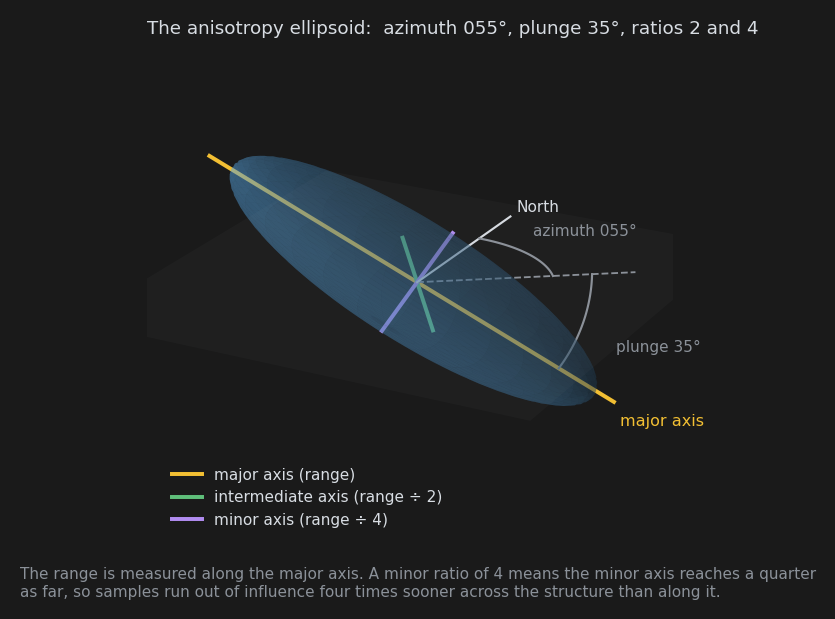
Five numbers define it. On the Run tab they are entered as Aniso az / plunge / dip (the three angles) and Aniso ratios (the two ratios).
| Field | Meaning |
|---|---|
| Azimuth | Bearing of the major axis, degrees clockwise from north |
| Plunge | Angle of the major axis below horizontal, positive downwards |
| Dip | Roll about the major axis. At dip 0 the intermediate axis is horizontal; positive dip rotates it towards the minor axis, clockwise when looking down plunge |
| Intermediate ratio (first of the Aniso ratios) | Major range divided by intermediate range |
| Minor ratio (second of the Aniso ratios) | Major range divided by minor range |
The range entered on the Run tab is measured along the major axis. The ratios shorten the other two: a minor ratio of 4 means influence reaches only a quarter as far across the structure as along it. Ratios of 1 and 1 are isotropic - a sphere, and no direction preferred.
Ratios are always 1 or greater. If you find yourself wanting a ratio below 1, your major axis is pointing the wrong way: rotate it to the genuinely longest direction and rebuild the ratios from there.
The third angle, dip, is the one people skip. It only matters when the intermediate and minor ratios differ - it says how the flattening is oriented around the long axis. For a plunging shoot inside a dipping horizon, getting it right is the difference between a lens that lies in the plane of the host and one that cuts across it.
Getting the Numbers
There are three ways to arrive at a set, and they work well together.
From the Scan
Step 2 of the Variogram tab measures anisotropy directly: it fits a variogram model along each direction of an azimuth and plunge grid and tabulates the ranges. The direction with the longest range is your major axis, the shortest is the minor, and the ratio between them is the strength of the anisotropy.
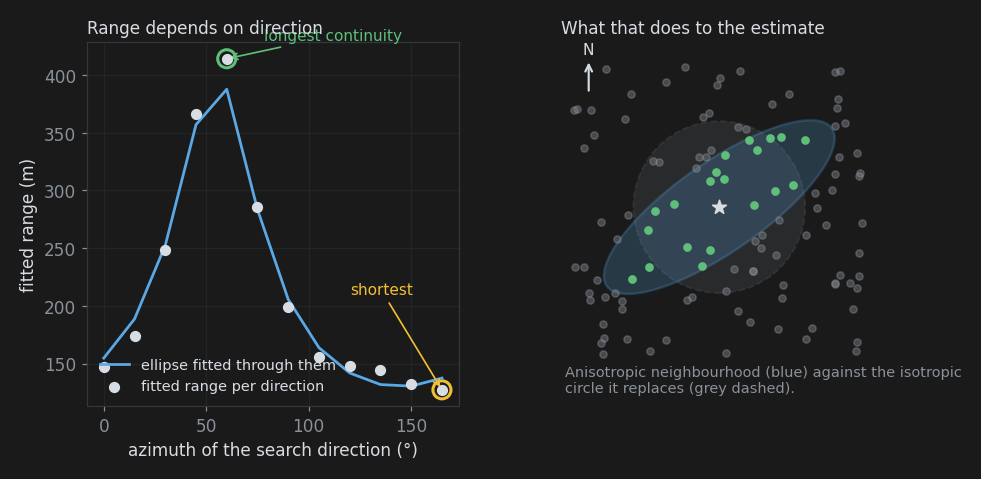
Apply to model parameters transfers the suggested ellipsoid, which is fitted through all the scanned directions rather than just the two extremes - so the axes are not restricted to the scan grid, the dip is resolved, and the noise in individual direction fits is averaged out. That is also why its ratios are usually a little gentler than the raw longest-over-shortest ratio quoted above it.
From the Geology
If you know the orientation of the structure that controls your values, you can enter it directly, and you should check the scan against it in any case.
- Stratabound or flat-lying: the two long axes lie in the bedding plane. Set the plunge to 0, azimuth along strike, and use an intermediate ratio near 1 with a large minor ratio - continuity is similar in all directions within the plane and poor across it. Something like 1 and 8 is a typical starting shape.
- Vein or shear: the major axis lies in the plane of the structure, usually down plunge of the ore shoot. Azimuth and plunge come from the shoot, dip orients the plane of the vein, and the minor ratio describes how thin it is.
- Massive or nested: if nothing suggests a direction, leave it isotropic. An invented anisotropy is worse than none.
From Trying It
Anisotropy ratios are a good thing to test on the Quality tab. Run a cross validation with the ratios you believe, then again with them stronger, and compare the regression slopes and errors. Over-smoothing - a low slope - often improves markedly when a real anisotropy is finally described, because the estimator stops averaging across a structure that does not actually connect.
How It Affects the Result
Two things change when the ellipsoid is not a sphere.
Weights follow the structure. A sample 200 m away along the major axis can carry more weight than one 80 m across it. Isosurfaces stretch along strike or plunge instead of ballooning around each hole, which is usually the visible improvement people notice first.
The distance mask follows it too. By default the "distance to nearest sample" recorded with the grid is measured in the ellipsoid's own frame, in major-axis metres, so a node far away down plunge counts as well supported while a node the same straight-line distance across the structure does not. That is the behaviour you want, since it matches how far the model can actually see. Tick Isotropic distance mask on the Run tab if you would rather have plain straight-line distance - for reporting a simple drilling coverage radius, say.
Sanity Checks
- Does the major axis agree with the geology, or at least not contradict it?
- Is the drilling capable of seeing the direction it reports? A single fence of holes will happily produce a strong "anisotropy" along the fence.
- Do the pair counts in the scan table support the extreme directions, or are the longest and shortest ranges both from thinly populated rows?
- Is the ratio believable? Ratios of 2 to 4 are ordinary. Ratios above 10 say your data is nearly one-dimensional, which happens, but check it.
Also See
- Variogram tab - measuring anisotropy from your data
- Run tab - where the ellipsoid is entered
- Kriging Concepts