
Quality Tab
Note
Coming in Spatial Integration version 3.
An interpolation always produces a grid. The Quality tab is how you find out whether that grid deserves to be believed, and if not, what to change.
There is deliberately no single quality score. The four checks here measure different things and trade off against each other - a model can win on one and lose on another - so collapsing them into one number would hide exactly the information you need.
1. Cross Validation
Cross validation is the honest test. The samples are split into folds; the model is refitted with one fold hidden, and every sample in that fold is then estimated by a model that never saw it. Repeat for each fold and you have, for every sample, an estimate made in something close to the situation the grid is actually in - estimating where no data exists.
- Folds is how many splits to use. Ten is the usual compromise between reliability and time. Leave-one-out validation is not offered; at real dataset sizes it is unusable.
- Group folds by hole assigns whole holes to folds, and should normally stay ticked. With per-sample folds, a hidden sample's neighbours a metre up and down the same hole remain in the training set, so it is estimated almost perfectly and every metric comes out flattering. Grouping by hole makes the test ask "could you have predicted this hole from the others?", which is the question that matters.
Cross validation costs roughly as many fits as there are folds, so it takes several times longer than one interpolation. Fits run one at a time, so a run or a residual calculation will make it wait.
Reading the Results
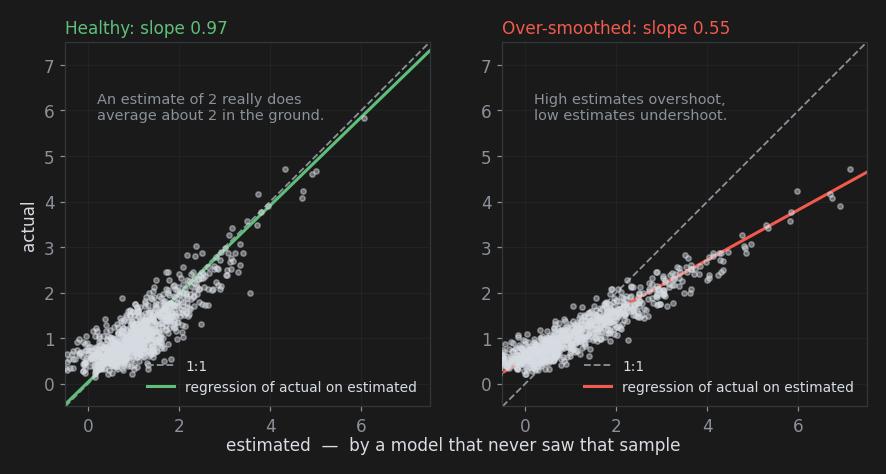
The headline number is the regression slope - the slope of actual values regressed on the held-out estimates.
| Slope | Meaning |
|---|---|
| Near 1.0 | An estimate of x really does average about x in the ground. This is what you want |
| 0.85 to 1.0 | Mild over-smoothing. Usually acceptable |
| Below 0.85 | Amber. The model over-smooths: high estimates overshoot the truth, low ones undershoot |
| Below 0.6 | Red. Severe conditional bias - grade is being smeared from rich zones into poor ones |
The slope is the number that exposes over-smoothing, and it is the reason it is given top billing. RMSE actually rewards over-smoothing: an estimator that predicts the mean everywhere has a respectable RMSE and is completely useless. If your slope is low, the remedies in order of effect are usually to describe the anisotropy properly, reduce the nugget, or shorten the range.
Three supporting numbers follow.
- RMSE - typical error size, in your value units. Useful for comparing two models on the same data, not for much else.
- Mean error (bias) - the average of estimated minus actual. Positive means the model over-estimates overall. It should be near zero.
- Correlation - how well estimates and reality track each other, ignoring scale.
The scatter plot shows held-out estimates against actual values, with the 1:1 line and the fitted regression. A healthy plot is a cloud along the 1:1 line; over-smoothing shows as a cloud flatter than 1:1, narrow in the estimate direction and wide in the actual direction.
2. Residuals at Sample Locations
This check fits the model to all of the samples and then evaluates it back at those same sample positions. With a nonzero nugget the estimate does not pass exactly through the data, and the misfit is informative - not because it is large or small, but because of where it is.
Random residuals scattered evenly through the deposit are what a good model looks like. Residuals that cluster - all the big misses in one lithology, one level, one part of the pit - are a sign of structure the model is not describing. That usually means a domain that should have been separated, or an anisotropy that changes across the deposit.
The summary line gives mean absolute residual, RMSE and the largest absolute residual, and the histogram shows the distribution. But a histogram cannot show you where, which is what Add residuals to scene as points is for: it writes the residuals to a CSV file beside the output file and opens the point loader, where you colour by the abs_residual or residual column and look at the result in 3D. That look is the whole point of this section.
Note
Residuals measure fit to data the model has already seen, so they always look better than cross validation. Never use them as an accuracy estimate - use them as a map.
3. Grid vs Sample Statistics
This section compares the statistics of the completed grid against the statistics of the samples it came from, and needs a finished run.
Variance ratio (grid / samples) is the smoothing measurement. Kriging always smooths, so this is always below 1 - the question is by how much. A second line reports the ratio computed only within the distance threshold, and that is the number to judge by: nodes far from any data trend towards the mean, which deflates the whole-grid ratio for reasons of coverage rather than smoothing.
Below about 0.6 the grid keeps less than 60% of the sample variability, and the tab flags it. Taken together with a low cross-validation slope, that is a clear over-smoothing verdict, and the same remedies apply: describe the anisotropy, reduce the nugget, shorten the range.
Grid mean vs declustered sample mean is the bias check. The comparison is against the declustered mean deliberately: the plain sample mean is inflated by the tendency to drill good ground more densely, so a grid that matches the plain mean is probably over-estimating. A grid mean sitting near the declustered mean is a good sign.
The minimum and maximum rows show the other face of smoothing. The grid will not reach the sample extremes, and it should not - a single high assay is not evidence that a whole block is that grade.
4. Extrapolation
Beyond your data, an estimate is not an interpolation at all. This section tells you how much of the grid is in that condition, and what to do about it.
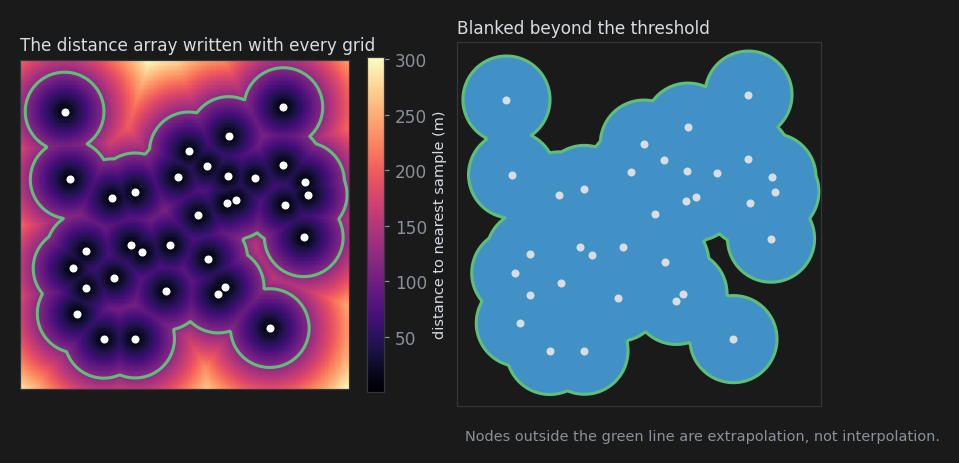
Distance threshold is the distance beyond which a node is considered extrapolation. It defaults to one mean between-hole spacing, on the reasoning that past that distance no hole constrains the estimate. It is measured the same way the distance array is - in the anisotropy's frame by default, or in plain metres when Isotropic distance mask is ticked on the Run tab.
Mask output decides what the next run writes.
- Write distance array - the value is written for every node, along with the distance array. Nothing is hidden, and you can decide what to trust later, in the viewer.
- Blank nodes beyond threshold - nodes past the threshold are written as blanks, which display as gaps. The distance array is still written either way, so the threshold can still be revisited.
Below the controls, the node count and percentage of the grid volume beyond the threshold is reported. Change the threshold and the figure updates immediately as an estimate from a sample of the nodes, marked with a ~; the exact count is recomputed on the next run.
A large extrapolated fraction is not automatically wrong - a grid built on the bounding box of scattered holes will have plenty of empty corners. It is only a problem when the extrapolated region is the part you were planning to talk about.
Why There Is No Kriging Variance
Conventional kriging reports an estimation variance per node, and people use it as a confidence map. It is not offered here, and nothing pretends to substitute for it: SI solves the estimate for all samples at once, and that approach does not produce one.
That is less of a loss than it first appears. Kriging variance depends only on the sample geometry and the variogram model - not on the values - so it is really a map of data coverage dressed up as uncertainty, and it inherits every error in the variogram model besides. The distance array gives you the coverage map directly and honestly, and cross validation gives you a real, measured error rather than a modelled one.
Also See
- Run tab
- Kriging Concepts - why smoothing happens
- Troubleshooting - fixing what these checks find