
Desurveying Drill Holes
Drill holes are not straight! You would be surprised at just how much a drill hole can bend. To know where our downhole samples come from in 3D space, we need to map the curve of the hole. We measure the dip and azimuth of the hole at a number of depths, then "desurvey" the hole to track its path through the ground.
We build the drill hole path from a series of straight line segments, each with a length and a direction. The first segment starts at the collar. The second starts at the end of the first and heads off in an updated direction, and so on down the hole. That part is simple. The tricky bit is working out the direction of each segment.
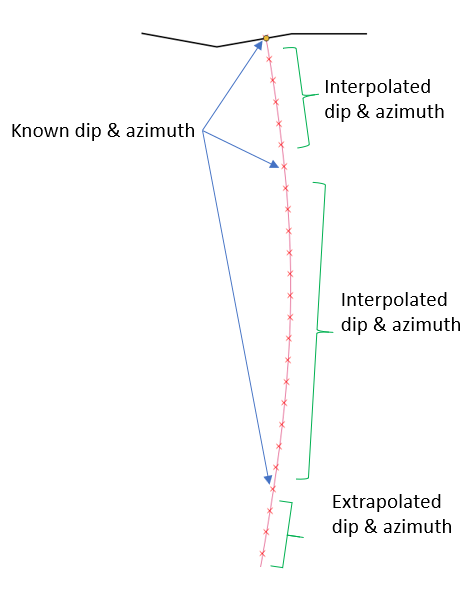
Survey Data
We know the hole direction at one or more depths, and usually one of these is the collar. If the collar is the only direction we have, Geoscience assumes the hole is straight. The collar direction can be given as dip and azimuth columns in the collar file, or as a row at 0 depth in the optional survey file. Below is an example of a CSV survey file.
HoleID, Depth, Az, Dip
DDH01, 0, 10, 0
DDH01, 50, 350, 0
DDH91, 0, 45, -80
DDH91, 50, 230, -80
DDHXX, 0, 10, -80
DDHXX, 50, 170, -80
This example is in the testdata directory of your Geoscience plugin installation.
A survey tool run down the hole measures the dip and azimuth at many depths, which tracks the path of the hole more closely. The usual sampling rules apply: the readings must be close enough together to capture the curve of the hole.
Survey readings go in the survey file, with columns for HoleID, Depth, Dip and Azimuth. Geoscience combines them with any dip and azimuth in the collar file and sorts them by depth. It needs a reading at both the top (collar) and the bottom of the hole, so if either is missing it copies the nearest reading.
Note
If there are no surveys for a hole, it is assumed to be vertical.
Interpolating the Rotation
The dip and azimuth at each survey point can be described as a rotation away from a horizontal line pointing north (i.e. 0 azimuth and 0 dip). Geoscience stores this rotation as a quaternion.
So we now have a quaternion for the rotation at each survey point, including the top and bottom of the hole. We still need the rotation of every segment in between. We could keep the same rotation until we reach the next survey point, but that isn't realistic: holes don't go straight and then kink. It is much more likely that the direction changes smoothly from one survey point to the next.
Quaternions have a very useful property: you can interpolate smoothly between two of them, turning at a constant rate. This is called Spherical Linear Interpolation, or SLERP. Geoscience uses it to work out the rotation (dip and azimuth) of each segment between the survey points.
Important
It is not the position of the segments that is interpolated. It is the rotation.
Once we know the length (the Desurvey length in the Desurvey Hole dialog) and rotation of each segment, it is simple to calculate where it ends and attach it to the end of the previous one. All you need to supply is the collar location and the depth, dip and azimuth of your survey points.
3D Coordinates
Geoscience desurveys in full 3D. The CollarLayerName_Desurvey.gpkg file it creates has one row for each drill hole, and the geometry of each row is a polyline. Each node of the polyline is one of the 3D points calculated above. When the polyline is displayed in plan, the Z coordinate is ignored and the hole is projected to the surface.
When you process downhole data (assays, lithology etc.), Geoscience calculates the 3D position of each sample by interpolating between the desurveyed nodes on either side of its depth. Sections use the same 3D coordinates to work out what to show.